
Pimoroni Inky wHAT (ePaper/eInk/EPD)


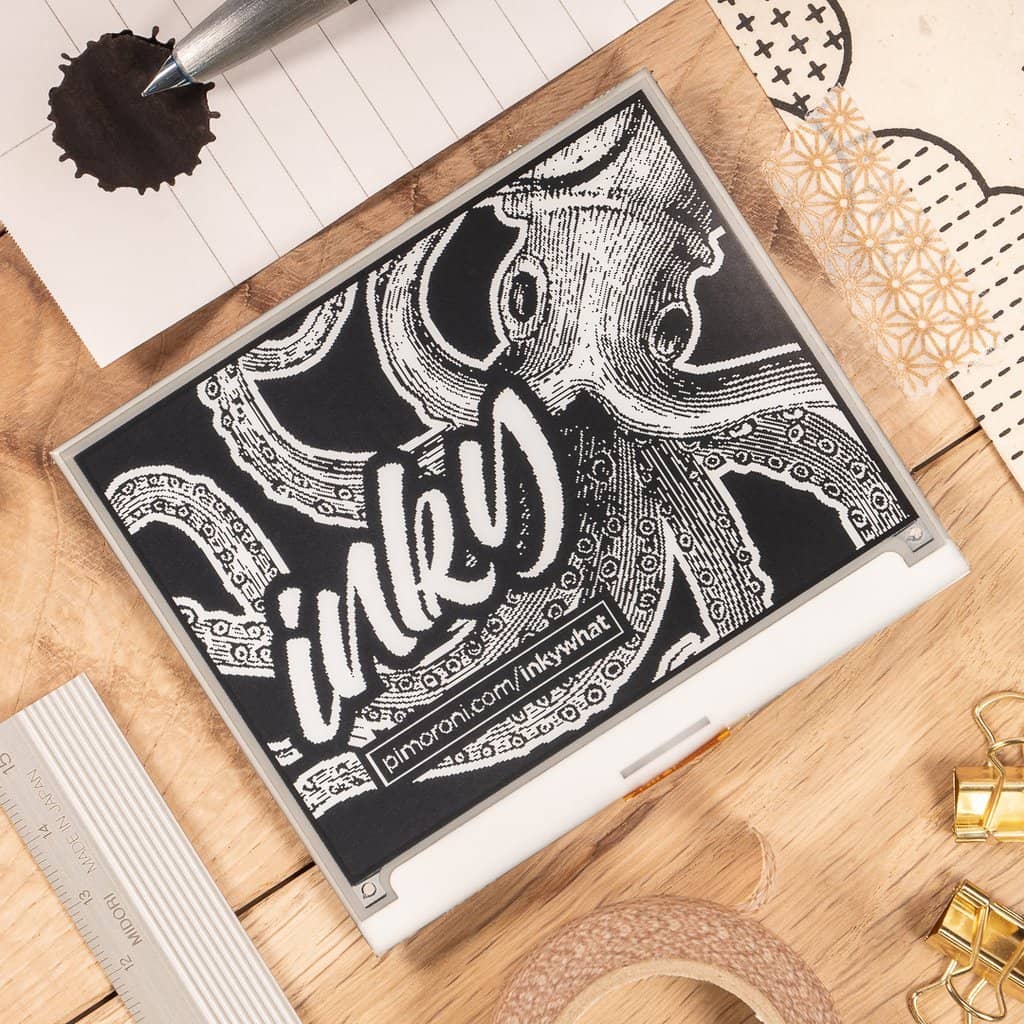

Pimoroni Inky wHAT (ePaper/eInk/EPD)
$61.99
Free shipping
30-day returns
·Authorized Raspberry Pi reseller
Out of stock – check back soon
Order now to receive it in 4 business days
SKU: PIM433
The Pimoroni Inky wHAT is a 400x300 pixel electronic paper (ePaper / eInk / EPD) display for Raspberry Pi, a larger version of our popular Inky pHAT display, with more than 5x the number of pixels, and available in three color schemes - red/black/white, yellow/black/white, and black/white.
The larger display opens up many more possibilities, with significantly more space to display information. Like Inky pHAT, the display is crisp and readable in bright sunlight.
Use Inky wHAT as a detailed weather display, as a calendar, for daily news reports, to list household chores, or you could even use it as a tiny DIY e-reader to read your e-books.
Features
- 4.2" EPD display (400x300 pixels)
- 40-pin female header included to boost height for full-size Pis
- Standoffs included to securely attach to your Pi
- Additional pins, including I2C and SPI, broken out
- Inky wHAT pinout
- Compatible with all 40-pin header Raspberry Pi models
- Python library
- Comes fully assembled
Multi-colour EPD displays, like the one on Inky wHAT, use ingenious electrophoresis to pull colored particles up and down on the display. The colored particles reflect light, unlike most display types, meaning that they're visible under bright lights. It takes approximately 25 seconds to refresh the display.
Everything comes fully assembled, and there's no soldering required! The display is securely stuck down to the Inky wHAT PCB and connected via a ribbon cable. Just pop Inky on your Pi and run our installer to get everything set up!
We've also broken out some handy pins including I2C and SPI, on the back of Inky wHAT, letting you connect additional devices like Pimoronis breakouts and allowing you to show their data right on the display.
Inky wHAT works with any 40-pin version of the Pi, including Pi Zero and Pi Zero W.
Software
Pimoroni's Python library takes the stress out of displaying text and images on Inky wHAT, and we've put together a few examples to show off Inky wHAT's capabilities. We've put together a one-line installer for the Python library too, to make installation a little more straightforward.
Notes
- Pro-tip: you can treat the three-color displays as black and white - InkyPHAT("black") - and they'll refresh as quickly as a black-and-white display, in just a couple of seconds
- The Inky wHAT display is made from glass so it's pretty fragile. Be careful not to drop it or press too hard on it, or it will crack. When fitting the wHAT, grip at the edges of the board rather than pressing on top.
- Overall dimensions: 91x77x8.5mm (WxHxD, depth includes header and display)
- Display usable area dimensions: 84.8x63.6mm (WxH), 4.2" diagonal
SKU:
PIM433
Barcode:
Description
The Pimoroni Inky wHAT is a 400x300 pixel electronic paper (ePaper / eInk / EPD) display for Raspberry Pi, a larger version of our popular Inky pHAT display, with more than 5x the number of pixels, and available in three color schemes - red/black/white, yellow/black/white, and black/white.
The larger display opens up many more possibilities, with significantly more space to display information. Like Inky pHAT, the display is crisp and readable in bright sunlight.
Use Inky wHAT as a detailed weather display, as a calendar, for daily news reports, to list household chores, or you could even use it as a tiny DIY e-reader to read your e-books.
Features
- 4.2" EPD display (400x300 pixels)
- 40-pin female header included to boost height for full-size Pis
- Standoffs included to securely attach to your Pi
- Additional pins, including I2C and SPI, broken out
- Inky wHAT pinout
- Compatible with all 40-pin header Raspberry Pi models
- Python library
- Comes fully assembled
Multi-colour EPD displays, like the one on Inky wHAT, use ingenious electrophoresis to pull colored particles up and down on the display. The colored particles reflect light, unlike most display types, meaning that they're visible under bright lights. It takes approximately 25 seconds to refresh the display.
Everything comes fully assembled, and there's no soldering required! The display is securely stuck down to the Inky wHAT PCB and connected via a ribbon cable. Just pop Inky on your Pi and run our installer to get everything set up!
We've also broken out some handy pins including I2C and SPI, on the back of Inky wHAT, letting you connect additional devices like Pimoronis breakouts and allowing you to show their data right on the display.
Inky wHAT works with any 40-pin version of the Pi, including Pi Zero and Pi Zero W.
Software
Pimoroni's Python library takes the stress out of displaying text and images on Inky wHAT, and we've put together a few examples to show off Inky wHAT's capabilities. We've put together a one-line installer for the Python library too, to make installation a little more straightforward.
Notes
- Pro-tip: you can treat the three-color displays as black and white - InkyPHAT("black") - and they'll refresh as quickly as a black-and-white display, in just a couple of seconds
- The Inky wHAT display is made from glass so it's pretty fragile. Be careful not to drop it or press too hard on it, or it will crack. When fitting the wHAT, grip at the edges of the board rather than pressing on top.
- Overall dimensions: 91x77x8.5mm (WxHxD, depth includes header and display)
- Display usable area dimensions: 84.8x63.6mm (WxH), 4.2" diagonal
SKU:
PIM433
Barcode:
Guides & tutorials
See all →-
 Project · Raspberry Pi
Raspberry Pi Piano
Build a working piano keyboard using Raspberry Pi GPIO pins, push buttons, and Python to play musical notes.
Intermediate · 90 minutes
-
 Project · Raspberry Pi
Wii Remote Digital Graffiti
Create digital graffiti art using a Wii remote and Raspberry Pi with motion tracking and drawing capabilities.
Advanced · 60 minutes
-
 Project · Raspberry Pi
9 Things to Do After Buying a Raspberry Pi
Essential setup and configuration steps for new Raspberry Pi owners, from OS installation to first projects.
Beginner · 60–90 minutes
-
 Project · Raspberry Pi
Stop Motion Animation Studio
Create your own stop motion animated videos using Raspberry Pi, PiCam, and Python for frame capture.
Intermediate · 60 minutes setup + filming time
-
 Project · Raspberry Pi
Build Your Own Robot with Raspberry Pi
Create a cardboard robot with LED antenna and sound effects using Raspberry Pi, perfect for kids and beginners.
Beginner · 45–60 minutes
-
 Project · Raspberry Pi
How to update a Raspberry Pi
Keep your Raspberry Pi fast and secure with three Terminal commands: check for updates, install them, then restart.
Beginner · 10 to 30 minutes


