Sold Out
Pimoroni Pico Omnibus (Dual Expander)
See What 1 Happy Customers Said
About Their Purchase
Free Shipping
Couldn't load pickup availability
You May Also Need
30-Day Easy Returns
Secure Checkout Guaranteed
Free Shipping in USA
30-Day Easy Returns
Secure Checkout Guaranteed
Free Shipping in USA
30-Day Easy Returns
Secure Checkout Guaranteed
Free Shipping in USA
30-Day Easy Returns
Secure Checkout Guaranteed
Free Shipping in USA
30-Day Easy Returns
Secure Checkout Guaranteed
Free Shipping in USA
30-Day Easy Returns
Secure Checkout Guaranteed
Free Shipping in USA
30-Day Easy Returns
Secure Checkout Guaranteed
Free Shipping in USA
30-Day Easy Returns
Secure Checkout Guaranteed
Free Shipping in USA
30-Day Easy Returns
Secure Checkout Guaranteed
Free Shipping in USA
30-Day Easy Returns
Secure Checkout Guaranteed
Free Shipping in USA
30-Day Easy Returns
Secure Checkout Guaranteed
Free Shipping in USA

Double up your GPIO pins and attach two add-ons to a single Raspberry Pi Pico with the Pimoroni expansive Pico Omnibus!
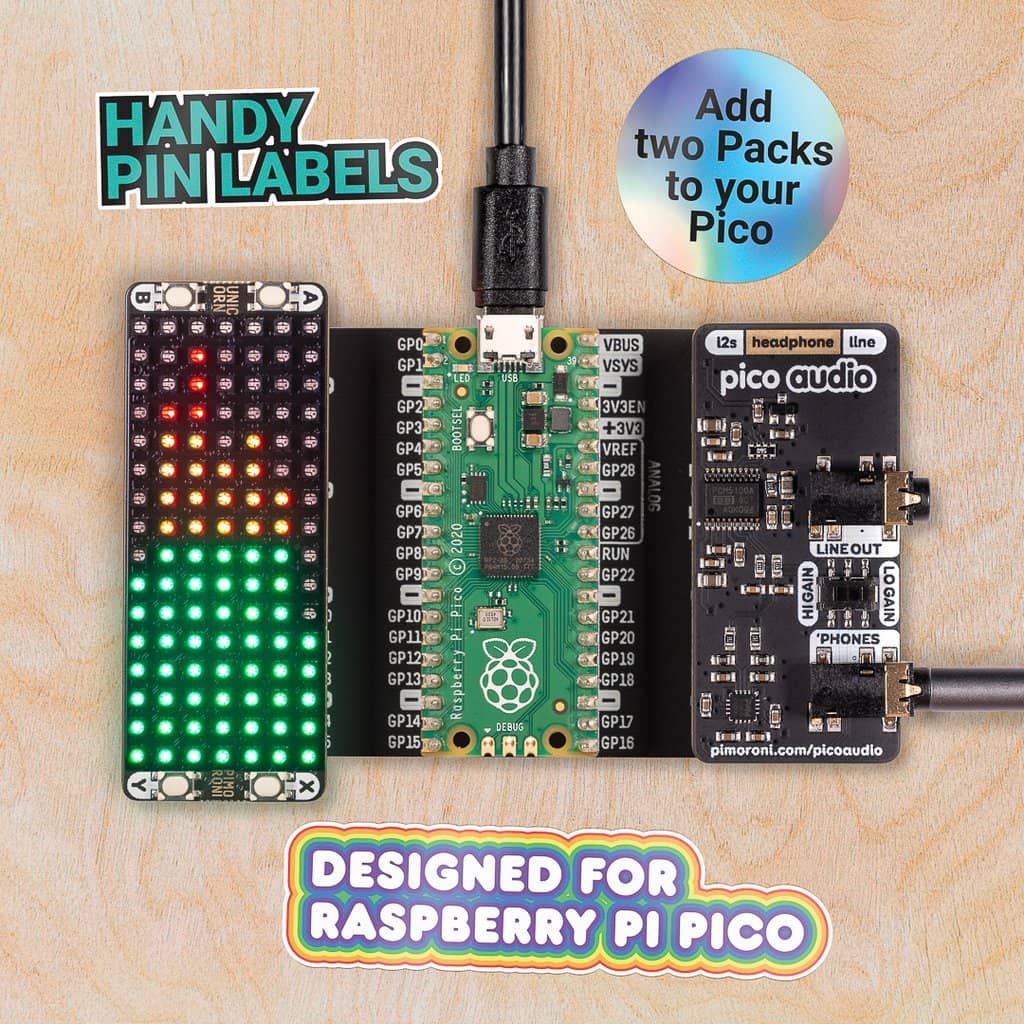
Struggling to choose which Pico add-on to go for? Pico Omnibus lets you plug in two Pico Packs or Bases at once*, or you can use the extra set of male GPIO pins to easily attach other devices, jumper wires, or circuitry - very useful for prototyping. Pimoroni has added useful labels to all three sets of connectors, so you can be sure that all those lovely wires are going to the right places and have also thrown in some little feet to keep everything solid.
If two sets of GPIO are just not enough, why not consider the four-slot Pico Decker?
A Raspberry Pi Pico is not included - click here if you'd like to buy one!
About Raspberry Pi Pico
Raspberry Pi Pico is a flexible, low-cost microcontroller development board from the folks at Raspberry Pi, based on their very own chip - the RP2040. It's easily programmable over USB with C/C++ or MicroPython, and ideal for use in all sorts of physical computing projects, devices, and inventions - we're so excited to see what you make with it!
Pimoroni calls their Pico-sized add-ons packs, as they're designed to attach to the back of your Pico as if it were wearing a very stylish backpack (or a miniature jet pack, if you prefer). Pimoroni also makes Pico bases (larger add-on boards with a space to mount your Pico on top) and some other boards that let you do interesting hacker things like using multiple packs at once.
Your Pico will need to have male headers soldered to it (with the pins pointing downwards) to attach to our add-on boards.
Features
- One landing area with labeled female headers for attaching to your Pico.
- Two landing areas with labeled (mirrored) male headers for attaching add-ons.
- 4x rubber feet
- Compatible with Raspberry Pi Pico.
- 99% assembled - just need to stick on the feet!
- Fully assembled.
- No soldering is required.
- Dimensions: approx 94mm x 52 mm x 12mm (L x W x H, including headers)
Notes
- * You'll need to check for data pin conflicts when using multiple Pico add-ons - we'd recommend using pinout. xyz or checking the shop page for the add-on in question!
- * If you're plumbing a Pico Base into Pico Omnibus, you'll probably want to do it via some male-female jumper jerky to keep everything manageable and to stop everything from being quite so upside-down!
- The Pico Packs shown in the photo are not included.
Description
Double up your GPIO pins and attach two add-ons to a single Raspberry Pi Pico with the Pimoroni expansive Pico Omnibus!
Struggling to choose which Pico add-on to go for? Pico Omnibus lets you plug in two Pico Packs or Bases at once*, or you can use the extra set of male GPIO pins to easily attach other devices, jumper wires, or circuitry - very useful for prototyping. Pimoroni has added useful labels to all three sets of connectors, so you can be sure that all those lovely wires are going to the right places and have also thrown in some little feet to keep everything solid.
If two sets of GPIO are just not enough, why not consider the four-slot Pico Decker?
A Raspberry Pi Pico is not included - click here if you'd like to buy one!
About Raspberry Pi Pico
Raspberry Pi Pico is a flexible, low-cost microcontroller development board from the folks at Raspberry Pi, based on their very own chip - the RP2040. It's easily programmable over USB with C/C++ or MicroPython, and ideal for use in all sorts of physical computing projects, devices, and inventions - we're so excited to see what you make with it!
Pimoroni calls their Pico-sized add-ons packs, as they're designed to attach to the back of your Pico as if it were wearing a very stylish backpack (or a miniature jet pack, if you prefer). Pimoroni also makes Pico bases (larger add-on boards with a space to mount your Pico on top) and some other boards that let you do interesting hacker things like using multiple packs at once.
Your Pico will need to have male headers soldered to it (with the pins pointing downwards) to attach to our add-on boards.
Features
- One landing area with labeled female headers for attaching to your Pico.
- Two landing areas with labeled (mirrored) male headers for attaching add-ons.
- 4x rubber feet
- Compatible with Raspberry Pi Pico.
- 99% assembled - just need to stick on the feet!
- Fully assembled.
- No soldering is required.
- Dimensions: approx 94mm x 52 mm x 12mm (L x W x H, including headers)
Notes
- * You'll need to check for data pin conflicts when using multiple Pico add-ons - we'd recommend using pinout. xyz or checking the shop page for the add-on in question!
- * If you're plumbing a Pico Base into Pico Omnibus, you'll probably want to do it via some male-female jumper jerky to keep everything manageable and to stop everything from being quite so upside-down!
- The Pico Packs shown in the photo are not included.
You May Also Need
-
-
-
-
-
Pimoroni Pico DV Demo Base$20.99 -
Pimoroni Pico Scroll Pack$15.64 -
-
Guides & tutorials
See all →-
Project · Raspberry PiAdd Ethernet to Raspberry Pi Pico
Connect a Raspberry Pi Pico to wired Ethernet networks using the W5500 Ethernet module for reliable IoT connectivity.
Intermediate · 60 minutes
-
Guide · Raspberry PiProgram a Raspberry Pi Pico
Get started programming your Raspberry Pi Pico. Use a PC, laptop, or Raspberry Pi 4 to write code and upload it to your Pico with MicroPython, C/C++, or Arduino IDE.
Beginner
-
Guide · Raspberry PiRaspberry Pi Pico basics
Raspberry Pi Pico is a low-cost microcontroller board, not a desktop computer like the Raspberry Pi 4 or 5. Learn what makes Pico unique, how to program it, and when to use it for your electronics projects.
Beginner
-
Project · Raspberry Pi9 Things to Do After Buying a Raspberry Pi
Essential setup and configuration steps for new Raspberry Pi owners, from OS installation to first projects.
Beginner · 60–90 minutes
-
Project · Raspberry PiWii Remote Digital Graffiti
Create digital graffiti art using a Wii remote and Raspberry Pi with motion tracking and drawing capabilities.
Advanced · 60 minutes
-
Project · Raspberry PiRaspberry Pi Piano
Build a working piano keyboard using Raspberry Pi GPIO pins, push buttons, and Python to play musical notes.
Intermediate · 90 minutes
- 5 stars: 1 (100%)
- 4 stars: 0 (0%)
- 3 stars: 0 (0%)
- 2 stars: 0 (0%)
- 1 star: 0 (0%)
P
Paul P. (Norwalk, US) Very helpful for adding displays & other add Ins with out single tying up the pico.