

Vilros Raspberry Pi Pico W Project Starter Kit
Vilros Raspberry Pi Pico W Project Starter Kit
 See What 1 Happy Customers Said
About Their Purchase
Free Shipping
You May Also Need


 30-Day Easy Returns
 Secure Checkout Guaranteed
 Free Shipping in USA
30-Day Easy Returns
Secure Checkout Guaranteed
Free Shipping in USA
30-Day Easy Returns
Secure Checkout Guaranteed
Free Shipping in USA
30-Day Easy Returns
Secure Checkout Guaranteed
Free Shipping in USA
30-Day Easy Returns
Secure Checkout Guaranteed
Free Shipping in USA
30-Day Easy Returns
Secure Checkout Guaranteed
Free Shipping in USA
30-Day Easy Returns
Secure Checkout Guaranteed
Free Shipping in USA
30-Day Easy Returns
Secure Checkout Guaranteed
Free Shipping in USA
30-Day Easy Returns
Secure Checkout Guaranteed
Free Shipping in USA
30-Day Easy Returns
Secure Checkout Guaranteed
Free Shipping in USA
30-Day Easy Returns
Secure Checkout Guaranteed
Free Shipping in USA

A Vilros Raspberry Pi Pico kit inspired by the Get Started with the Raspberry Pi Pico.
You can get started With PICO using the Get Started with Micro Python on Raspberry Pi Pico book.
The Book is book sold separately or can be downloaded for free.
Parts & Components
- 1x Raspberry Pi Pico W
-
1 × Full Size Solderless breadboard
800 Hole
Sticky Back
-
1x Holder and Breadboard Panel
Holds the Breadboard and Battery Holder in place for an easy and neat wiring experience.
-
30 × Jumper wires
10pcs male-to-female (M2F),
10pcs male-to-male (M2M)
10pcs female-to-female (F2F).
-
3 AA Battery Holder with Micro USB Connector
Power the Pico on the GO
-
1x Neoprene Parts Storage Case with Pocket
Internal Dimensions: 10x7 inches
Double Zipper
Black Neoprene
Pocket for accessories storage
Loop Handle
-
1 × USB Type-A to Micro Type-B 2.0 Cable
5-Pin
28/28AWG
-
1 × 3 Pin header.
Can be used on the SWD Pads if desired. (The SWD pads are NOT used Get Started with Micro Python on Raspberry Pi Pico book and not used in most projects)
-
Raspberry Pi Pico Pinout Guide Card
----------------------------------------------------------------------------------------------
Raspberry Pi Pico is a low-cost, high-performance microcontroller board with flexible digital interfaces. Key features include:
- RP2040 microcontroller chip designed by Raspberry Pi in the United Kingdom
- Dual-core Arm Cortex M0+ processor, flexible clock running up to 133 MHz
- 264KB of SRAM, and 2MB of on-board Flash memory
- Infineon CYW43439 wireless chip
- Castellated module allows soldering direct to carrier boards
- USB 1.1 with device and host support
- Low-power sleep and dormant modes
- Drag-and-drop programming using mass storage over USB
- 26 × multi-function GPIO pins
- 2 × SPI, 2 × I2C, 2 × UART, 3 × 12-bit ADC, 16 × controllable PWM channels
- Accurate clock and timer on-chip
- Temperature sensor
- Accelerated floating-point libraries on-chip
- 8 × Programmable I/O (PIO) state machines for custom peripheral support
- Presoldered Pin Headers and 3-pin JTAG connector
Raspberry Pi Pico and RP2040 FAQ
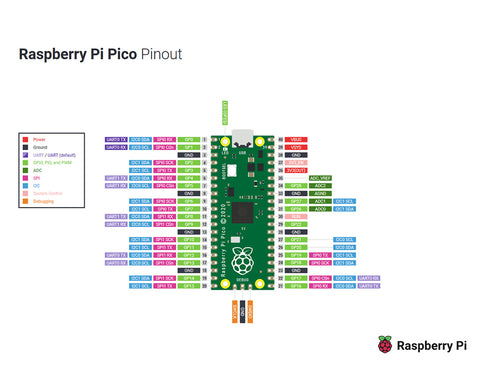
Download the PDF version here.
Manual, Datasheet, and SDK Resources
Description
A Vilros Raspberry Pi Pico kit inspired by the Get Started with the Raspberry Pi Pico.
You can get started With PICO using the Get Started with Micro Python on Raspberry Pi Pico book.
The Book is book sold separately or can be downloaded for free.
Parts & Components
- 1x Raspberry Pi Pico W
-
1 × Full Size Solderless breadboard
800 Hole
Sticky Back
-
1x Holder and Breadboard Panel
Holds the Breadboard and Battery Holder in place for an easy and neat wiring experience.
-
30 × Jumper wires
10pcs male-to-female (M2F),
10pcs male-to-male (M2M)
10pcs female-to-female (F2F).
-
3 AA Battery Holder with Micro USB Connector
Power the Pico on the GO
-
1x Neoprene Parts Storage Case with Pocket
Internal Dimensions: 10x7 inches
Double Zipper
Black Neoprene
Pocket for accessories storage
Loop Handle
-
1 × USB Type-A to Micro Type-B 2.0 Cable
5-Pin
28/28AWG
-
1 × 3 Pin header.
Can be used on the SWD Pads if desired. (The SWD pads are NOT used Get Started with Micro Python on Raspberry Pi Pico book and not used in most projects)
-
Raspberry Pi Pico Pinout Guide Card
----------------------------------------------------------------------------------------------
Raspberry Pi Pico is a low-cost, high-performance microcontroller board with flexible digital interfaces. Key features include:
- RP2040 microcontroller chip designed by Raspberry Pi in the United Kingdom
- Dual-core Arm Cortex M0+ processor, flexible clock running up to 133 MHz
- 264KB of SRAM, and 2MB of on-board Flash memory
- Infineon CYW43439 wireless chip
- Castellated module allows soldering direct to carrier boards
- USB 1.1 with device and host support
- Low-power sleep and dormant modes
- Drag-and-drop programming using mass storage over USB
- 26 × multi-function GPIO pins
- 2 × SPI, 2 × I2C, 2 × UART, 3 × 12-bit ADC, 16 × controllable PWM channels
- Accurate clock and timer on-chip
- Temperature sensor
- Accelerated floating-point libraries on-chip
- 8 × Programmable I/O (PIO) state machines for custom peripheral support
- Presoldered Pin Headers and 3-pin JTAG connector
Raspberry Pi Pico and RP2040 FAQ
Download the PDF version here.
Manual, Datasheet, and SDK Resources
You May Also Need
-
Pimoroni Pico DV Demo Base$20.99
-
Pimoroni Pico Scroll Pack$15.64


