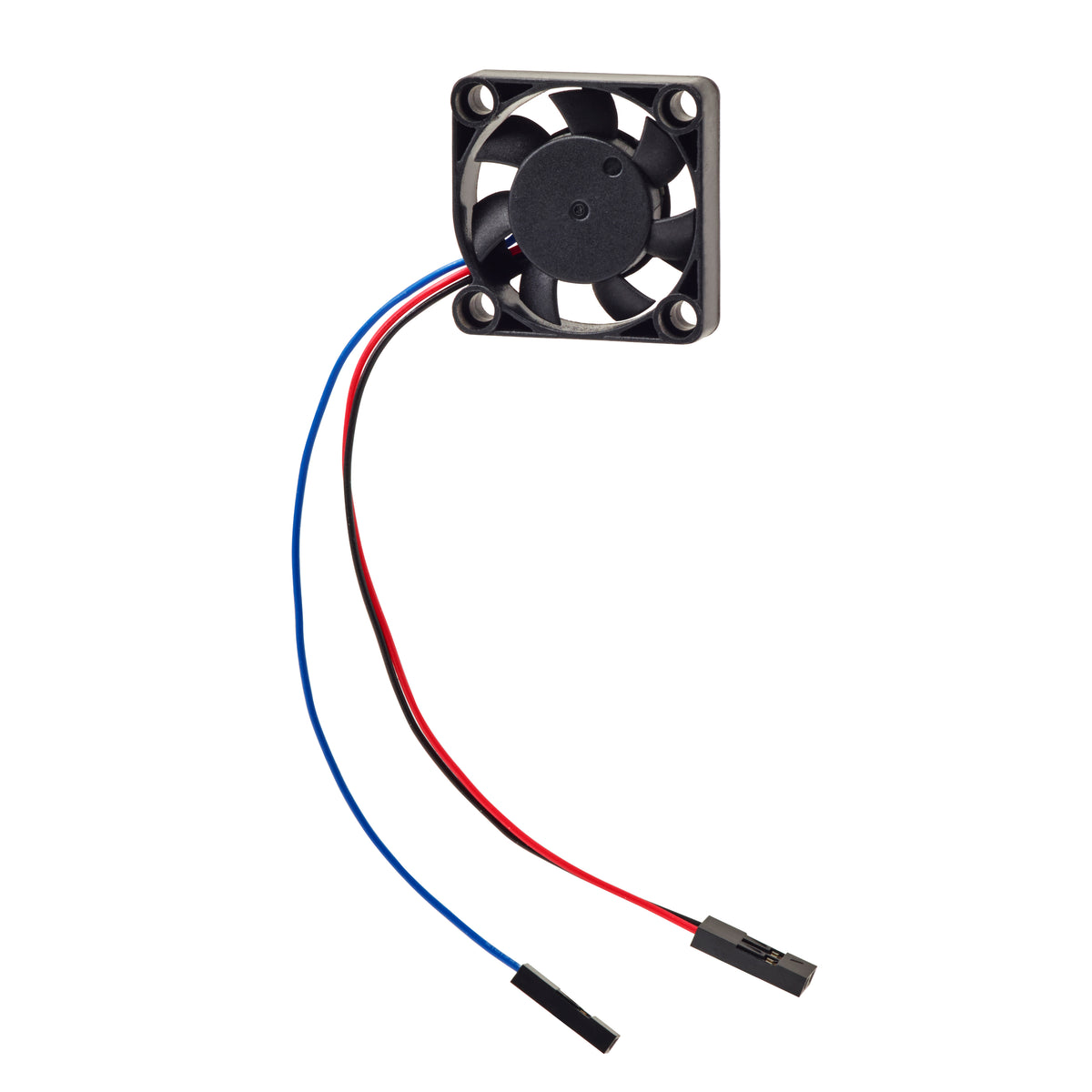
Vilros Raspberry Pi Compatible 7mm Configurable Fan-For Raspberry Pi 4
★★★★★
2 reviews


★★★★★
Vilros Raspberry Pi Compatible 7mm Configurable Fan-For Raspberry Pi 4
$6.99
30-day returns
·Authorized Raspberry Pi reseller
-  
-  
-  
-  
Tap once to add to cart, then pick your wallet.
In Stock
Order now to receive it in 4 business days
SKU: VILP244
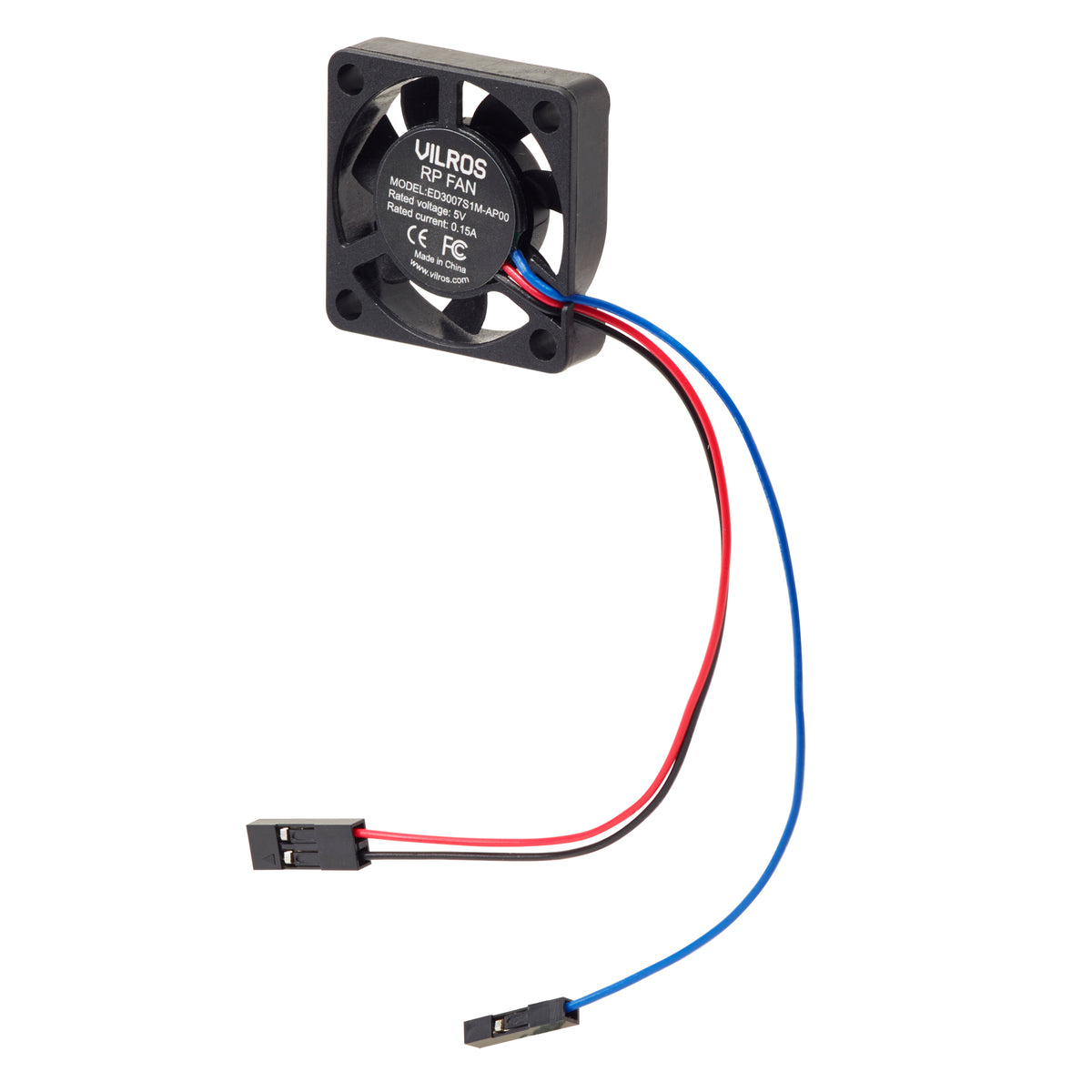
The Fan is compatible with Vilros Fan cases and features an additional Wire to be able to program the fan to turn on/off at certain temps.
INSTRUCTIONS:
Connect the Fan to the board by connecting the 2-pin header with red cable to Pin 4 (5v) and The Black Cable to Pin 6 (GND)
Once you have connected your fan, the fan will run whenever your Raspberry Pi has power.
If you would like to configure the fan to turn on/off via the RP OS setting then connect the Blue Cable to Pin 8 (GPIO 14).
You can choose to configure it to turn on only when your Raspberry Pi reaches a temperature that you choose by following the steps below:
- Update to the latest RP OS (see instructions here)
- Once updated open the Raspberry Pi Configuration tool by Clicking on the Raspberry Pi icon in the top left corner and selecting Preferences then Raspberry Pi Configuration.
- Select the Performance tab.
- Next to Fan, click Enabled.
- If you have connected your fan as described above, the default of 14 for Fan GPIO does not need to be changed.
- Select the Fan Temperature at which you want your fan to turn on. The default is 80°C, which will stop the Raspberry Pi from throttling on difficult tasks without having the fan on all the time.
See more info from the foundation in regards to fan setup here.
SKU:
VILP244
Barcode:
Warranty & Support
Products manufactured by Vilros are covered by a one-year limited warranty against manufacturing defects from the date of purchase.
Raspberry Pi products are covered by a one-year manufacturer's warranty (link).
Arduino products are covered by a one-year manufacturer's warranty (link).
What’s Covered
- Manufacturing defects in included hardware components
- Power supply and accessory functionality issues
- Missing or damaged items upon delivery
- Technical support for setup and starter guidance
Customer Support
If you believe your product is defective, please submit a warranty claim through the RMA process: https://vilros.com/a/service/returns
After reviewing the claim, Vilros may:
- Provide a replacement product, or
- Issue a refund where appropriate
Beginner-Friendly Confidence
Whether you're learning programming, building electronics projects, creating retro gaming systems, or experimenting with home automation, our support team is here to answer your questions and support your projects!
Description
The Fan is compatible with Vilros Fan cases and features an additional Wire to be able to program the fan to turn on/off at certain temps.
INSTRUCTIONS:
Connect the Fan to the board by connecting the 2-pin header with red cable to Pin 4 (5v) and The Black Cable to Pin 6 (GND)
Once you have connected your fan, the fan will run whenever your Raspberry Pi has power.
If you would like to configure the fan to turn on/off via the RP OS setting then connect the Blue Cable to Pin 8 (GPIO 14).
You can choose to configure it to turn on only when your Raspberry Pi reaches a temperature that you choose by following the steps below:
- Update to the latest RP OS (see instructions here)
- Once updated open the Raspberry Pi Configuration tool by Clicking on the Raspberry Pi icon in the top left corner and selecting Preferences then Raspberry Pi Configuration.
- Select the Performance tab.
- Next to Fan, click Enabled.
- If you have connected your fan as described above, the default of 14 for Fan GPIO does not need to be changed.
- Select the Fan Temperature at which you want your fan to turn on. The default is 80°C, which will stop the Raspberry Pi from throttling on difficult tasks without having the fan on all the time.
See more info from the foundation in regards to fan setup here.
SKU:
VILP244
Barcode:
Warranty
Warranty & Support
Products manufactured by Vilros are covered by a one-year limited warranty against manufacturing defects from the date of purchase.
Raspberry Pi products are covered by a one-year manufacturer's warranty (link).
Arduino products are covered by a one-year manufacturer's warranty (link).
What’s Covered
- Manufacturing defects in included hardware components
- Power supply and accessory functionality issues
- Missing or damaged items upon delivery
- Technical support for setup and starter guidance
Customer Support
If you believe your product is defective, please submit a warranty claim through the RMA process: https://vilros.com/a/service/returns
After reviewing the claim, Vilros may:
- Provide a replacement product, or
- Issue a refund where appropriate
Beginner-Friendly Confidence
Whether you're learning programming, building electronics projects, creating retro gaming systems, or experimenting with home automation, our support team is here to answer your questions and support your projects!
- 5 stars: 1 (50%)
- 4 stars: 1 (50%)
- 3 stars: 0 (0%)
- 2 stars: 0 (0%)
- 1 star: 0 (0%)
B
Barry R. (New Rochelle, US) This mini fan moves a lot of air for its size. It can cool my Raspberry Pi's CPU from its 70 degree setpoint by 10 degrees in well under a minute. A bit noisy but not very distracting.
J
James S. (Rochester, US) Hard to find quality, pricing, options and packaging like this, with free shipping no less. That was the decision maker for me. Items were build like a tank.
j
john what are the dimensions of the VILP244 fan?
Vilros.com
Hello,
Thank you for your question.
The dimensions are 30mm x 30mm x 7mm .
All the best
Vilros Support
J
Jeff C. Is SKU: VILP244 a 30mmx7mm fan that would work on the official POE+ HAT? If so I will gladly buy it! Thank you.
Vilros.com
Hello,
Thank you for your question.
This fan is not compatible with the official POE+ hat.
All the best
Vilros Support
Guides & tutorials
See all →-
Project · Raspberry PiBuild a Retro Gaming Console
Create your own retro gaming console using Raspberry Pi 4 and RetroPie to play classic games.
Beginner · 60 minutes
-
Guide · Raspberry Pi8GB Raspberry Pi 4 starter kits
Find Raspberry Pi 4 kit options with 8GB of RAM and check the exact configuration before ordering.
-
Project · Raspberry PiWork from Home with Raspberry Pi 400
Set up Raspberry Pi 400 as a complete work-from-home desktop with videoconferencing, office software, and printing.
Beginner · 30 minutes
-
Guide · Raspberry PiDo you sell revision 1.2 Raspberry Pi 4 boards?
Understand what to check when your project needs a particular Raspberry Pi 4 board revision.
-
Guide · Raspberry PiOverclock a Raspberry Pi 4
Get more performance from your Raspberry Pi 4 by overclocking the CPU and GPU. This guide covers safe overclocking procedures, configuration, testing, and temperature monitoring.
Advanced
-
Project · Raspberry PiSmart Bartender with Raspberry Pi
Build an automated drink dispenser using Raspberry Pi with pumps, relays, and a touch interface.
Advanced · 180 minutes