


Vilros Raspberry Pi 4 Complete Starter Kit
Vilros Raspberry Pi 4 Complete Starter Kit
 See What 169 Happy Customers Said
About Their Purchase
See What 169 Happy Customers Said
About Their Purchase
Free Shipping
If you’re new to Raspberry Pi, the Complete Starter Kit is the perfect purchase for you. It includes a Raspberry Pi 4 board, essential hardware, a pre-formatted Micro SD Card, and a Quickstart Guide designed for first-time users. With the Complete Starter Kit, you’ll have everything you need to get started right away.
Couldn't load pickup availability
 30-Day Easy Returns
 Secure Checkout Guaranteed
 Free Shipping in USA
30-Day Easy Returns
Secure Checkout Guaranteed
Free Shipping in USA
30-Day Easy Returns
Secure Checkout Guaranteed
Free Shipping in USA
30-Day Easy Returns
Secure Checkout Guaranteed
Free Shipping in USA
30-Day Easy Returns
Secure Checkout Guaranteed
Free Shipping in USA
30-Day Easy Returns
Secure Checkout Guaranteed
Free Shipping in USA
30-Day Easy Returns
Secure Checkout Guaranteed
Free Shipping in USA
30-Day Easy Returns
Secure Checkout Guaranteed
Free Shipping in USA
30-Day Easy Returns
Secure Checkout Guaranteed
Free Shipping in USA
30-Day Easy Returns
Secure Checkout Guaranteed
Free Shipping in USA
30-Day Easy Returns
Secure Checkout Guaranteed
Free Shipping in USA
Free Shipping in USA
30-Day Easy Returns
Secure Checkout Guaranteed
Free Shipping in USA
30-Day Easy Returns
Secure Checkout Guaranteed
Free Shipping in USA
30-Day Easy Returns
Secure Checkout Guaranteed
Free Shipping in USA
30-Day Easy Returns
Secure Checkout Guaranteed
Free Shipping in USA
30-Day Easy Returns
Secure Checkout Guaranteed
Free Shipping in USA
30-Day Easy Returns
Secure Checkout Guaranteed
Free Shipping in USA
30-Day Easy Returns
Secure Checkout Guaranteed
Free Shipping in USA
30-Day Easy Returns
Secure Checkout Guaranteed
Free Shipping in USA
30-Day Easy Returns
Secure Checkout Guaranteed
Free Shipping in USA
30-Day Easy Returns
Secure Checkout Guaranteed
Free Shipping in USA


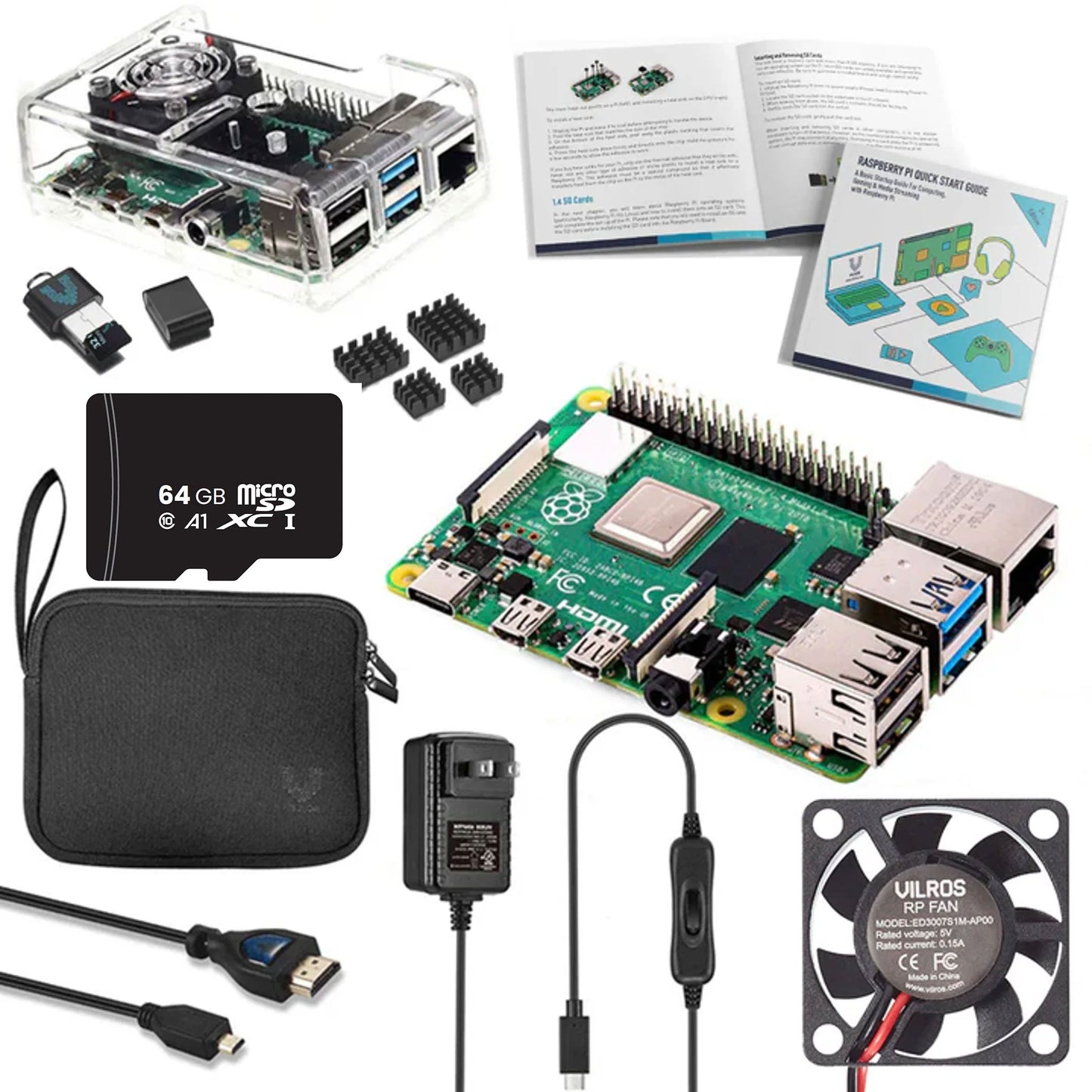
Everything you need to get started with Raspberry Pi 4.
The Raspberry Pi 4 Model B offers a level of desktop performance comparable to entry-level x86 PC systems, with access to two display outputs, Wi-Fi connectivity, and 40 GPIO pins.
If you’re new to Raspberry Pi, the Complete Starter Kit is the perfect way to get started. It offers a Raspberry Pi 4 board, essential hardware, a pre-formatted Micro SD Card, and a Quickstart Guide designed for first-time users. With the Complete Starter Kit, you’ll have everything you need to get started right away.
Included in the Vilros Raspberry Pi 4 Complete Starter Kit:
- Raspberry Pi 4 Model B (Choose GB capacity)
- Raspberry Pi 4 Compatible Case
- Vilros Raspberry Pi 4 Compatible USB-C 5V 3A Power switch Supply with On/Off Switch
- 64GB Micro SD card Preloaded with Raspberry Pi OS
- SD to USB Adapter
- Vilros HDMI (female) Micro HDMI (male) Cable
- Raspberry Pi Quickstart Guide
- Neoprene Storage Bag
-
Heatsink
Important: Passively Cooled Cases do NOT include a heatsink as the case contacts the chip directly.
Raspberry Pi 4 Key Features:
- Dual 4K Displays: Two Micro HDMI ports support a dual monitor setup.
- USB 3 Ports: Transfer data ten times faster with two USB 3 ports.
- Wi-Fi & Ethernet: Connect to the internet with Gigabit Ethernet or 2.4/5.0 GHz wireless LAN.
- Bluetooth: Link other devices to the Raspberry Pi 4 using a Bluetooth 5.0 connection.
- GPIO Pins: 40-pin GPIO header for connecting sensors, motors, and devices.
Operating Requirements
- Power Supply: A 15W USB-C power supply is included in the Complete Starter Kit.
- Micro SD card with Raspberry Pi OS: Included in the Complete Starter Kit.
- Keyboard and Mouse: Connected through the Raspberry Pi’s USB ports.
- Micro HDMI Cable: Used to connect a monitor to your Raspberry Pi 4 – included in the Kit.
How Much RAM Do You Need?
More RAM allows the Raspberry Pi to run more programs at once, handle larger files, or support more demanding applications without slowing down. If you're not sure which to choose, the 4GB option is a great place to start for most beginners and educators.
1GB – Best for very simple tasks like command-line interfaces, lightweight automation, or running a single small program. Not ideal for desktop use or multitasking. (Note: this version is now discontinued in many regions.)
2GB – Great for general use and light projects like coding, media playback, or running a single app smoothly. Good balance of cost and function for basic use.
4GB – Ideal for heavier multitasking, full desktop environments, or more advanced DIY projects. Recommended for users who plan to run multiple apps or use a graphical interface regularly.
8GB – Best for power users, developers, and advanced projects like databases, emulation, running containers, or media servers.
Raspberry Pi 4 Board Specifications
- Processor: Broadcom BCM2711, quad-core Cortex-A72 (ARM v8) 64-bit SoC @ 1.5GHz
- Memory: Available with 1GB, 2GB, 4GB, or 8GB of LPDDR4-3200 SDRAM
- Connectivity: 2.4 GHz and 5.0 GHz IEEE 802.11b/g/n/ac wireless LAN, Bluetooth 5.0, BLE Gigabit Ethernet 2 × USB 3.0 ports 2 × USB 2.0 ports.
- GPIO: Standard 40-pin GPIO header (fully backward-compatible with previous boards)
- Video & sound: 2 × micro HDMI ports (up to 4Kp60 supported) 2-lane MIPI DSI display port 2-lane MIPI CSI camera port 4-pole stereo audio and composite video port
- Multimedia: H.265 (4Kp60 decode); H.264 (1080p60 decode, 1080p30 encode); OpenGL ES, 3.0 graphics
- SD card support: Micro SD card slot for loading operating system and data storage
- Input power: 5V DC via USB-C connector (minimum 3A1) 5V DC via GPIO header (minimum 3A1) Power over Ethernet (PoE)–enabled (requires separate PoE HAT)
- Environment: Operating temperature 0–50ºC
FAQ:
What is Raspberry Pi 4?
Raspberry Pi 4 Model B is the latest version of the Raspberry Pi board in the official Raspberry Pi range, boasting a 64bit quad-core 1.5ghz processor making it much faster than previous models. As well as WiFi and Bluetooth capabilities, making it ideal for both home entertainment systems and fully-fledged computing tasks such as word processing, etc.
It also has extended GPIO pins to aid further development opportunities so you can get started creating your own electronics projects and even control them from your PC with no extra hardware needed!
What can you use Raspberry Pi 4 for?
The uses for the Raspberry Pi 4 are many and varied, from a simple home media player to a fully functioning computer running Windows 10; it can even be used as a retro gaming machine. Alternatively, you could use it as a low-powered web server or install Kodi, turning your Pi into an all-in-one multimedia solution for your living room. You could simply use Raspberry Pi 4 as an everyday PC when connected to the internet through its built-in WiFi capabilities.
Do you need a fan for Raspberry Pi 4?
The Raspberry Pi 4 uses the same processor as its predecessor, the powerful quad-core arm cortex A53 rk3399. However, you won't need to worry about the Pi 4 getting overheated because it is now manufactured using a newer 14nm process instead of 28nm. This means Raspberry Pi 4 consumes less power, but it still runs pretty hot so a heatsink and/or fan is recommended to extend lifetime.
How much free space do I need for Raspberry Pi 4?
To run Windows 10 smoothly on your Raspberry Pi 4, you will need at least 8GB of storage space. Please keep in mind the Raspberry Pi 4 uses an RK3399 chip which is a 64-bit processor, which means it supports up to 128gb of storage. But, because the Pi 4 runs on ARM architecture, 32-bit applications are still limited to 2gb max while 64-bit apps can use more.
Raspberry Pi 4 Board Specifications
- Processor: Broadcom BCM2711, quad-core Cortex-A72 (ARM v8) 64-bit SoC @ 1.5GHz
- Memory: Available with 1GB, 2GB, 4GB, or 8GB of LPDDR4-3200 SDRAM
- Connectivity: 2.4 GHz and 5.0 GHz IEEE 802.11b/g/n/ac wireless LAN, Bluetooth 5.0, BLE Gigabit Ethernet, 2x USB 3.0 ports, 2x USB 2.0 ports.
- GPIO: Standard 40-pin GPIO header (fully backward-compatible with previous boards)
- Video & Sound: 2x micro HDMI ports (up to 4Kp60 supported), 2-lane MIPI DSI display port, 2-lane MIPI CSI camera port, 4-pole stereo audio and composite video port
- Multimedia: H.265 (4Kp60 decode); H.264 (1080p60 decode, 1080p30 encode); OpenGL ES, 3.0 graphics
- SD Card Support: Micro SD card slot for loading operating system and data storage
- Input power: 5V DC via USB-C connector (minimum 3A1), 5V DC via GPIO header (minimum 3A1), power over Ethernet (PoE)–enabled (requires separate PoE HAT)
- Environment: Operating temperature 0–50ºC
How Much RAM Do You Need?
More RAM allows the Raspberry Pi to run more programs at once, handle larger files, or support more demanding applications without slowing down. If you're not sure which to choose, the 4GB option is a great place to start for most beginners and educators.
1GB – Best for very simple tasks like command-line interfaces, lightweight automation, or running a single small program. Not ideal for desktop use or multitasking. (Note: this version is now discontinued in many regions.)
2GB – Great for general use and light projects like coding, media playback, or running a single app smoothly. Good balance of cost and function for basic use.
4GB – Ideal for heavier multitasking, full desktop environments, or more advanced DIY projects. Recommended for users who plan to run multiple apps or use a graphical interface regularly.
8GB – Best for power users, developers, and advanced projects like databases, emulation, running containers, or media servers.
Warranty & Support
Products manufactured by Vilros are covered by a one-year limited warranty against manufacturing defects from the date of purchase.
Raspberry Pi products are covered by a one-year manufacturer's warranty (link).
Arduino products are covered by a one-year manufacturer's warranty (link).
What’s Covered
- Manufacturing defects in included hardware components
- Power supply and accessory functionality issues
- Missing or damaged items upon delivery
- Technical support for setup and starter guidance
Customer Support
If you believe your product is defective, please submit a warranty claim through the RMA process: https://vilros.com/a/service/returns
After reviewing the claim, Vilros may:
- Provide a replacement product, or
- Issue a refund where appropriate
Beginner-Friendly Confidence
Whether you're learning programming, building electronics projects, creating retro gaming systems, or experimenting with home automation, our support team is here to answer your questions and support your projects!
What is Raspberry Pi 4?
Raspberry Pi 4 Model B is the latest version of the Raspberry Pi board in the official Raspberry Pi range, boasting a 64bit quad-core 1.5ghz processor making it much faster than previous models. As well as WiFi and Bluetooth capabilities, making it ideal for both home entertainment systems and fully-fledged computing tasks such as word processing, etc.
It also has extended GPIO pins to aid further development opportunities so you can get started creating your own electronics projects and even control them from your PC with no extra hardware needed!
What can you use Raspberry Pi 4 for?
The uses for the Raspberry Pi 4 are many and varied, from a simple home media player to a fully functioning computer running Windows 10; it can even be used as a retro gaming machine. Alternatively, you could use it as a low-powered web server or install Kodi, turning your Pi into an all-in-one multimedia solution for your living room. You could simply use Raspberry Pi 4 as an everyday PC when connected to the internet through its built-in WiFi capabilities.
Do you need a fan for Raspberry Pi 4?
The Raspberry Pi 4 uses the same processor as its predecessor, the powerful quad-core arm cortex A53 rk3399. However, you won't need to worry about the Pi 4 getting overheated because it is now manufactured using a newer 14nm process instead of 28nm. This means Raspberry Pi 4 consumes less power, but it still runs pretty hot so a heatsink and/or fan is recommended to extend lifetime.
How much free space do I need for Raspberry Pi 4?
To run Windows 10 smoothly on your Raspberry Pi 4, you will need at least 8GB of storage space. Please keep in mind the Raspberry Pi 4 uses an RK3399 chip which is a 64-bit processor, which means it supports up to 128gb of storage. But, because the Pi 4 runs on ARM architecture, 32-bit applications are still limited to 2gb max while 64-bit apps can use more.
Description
Everything you need to get started with Raspberry Pi 4.
The Raspberry Pi 4 Model B offers a level of desktop performance comparable to entry-level x86 PC systems, with access to two display outputs, Wi-Fi connectivity, and 40 GPIO pins.
If you’re new to Raspberry Pi, the Complete Starter Kit is the perfect way to get started. It offers a Raspberry Pi 4 board, essential hardware, a pre-formatted Micro SD Card, and a Quickstart Guide designed for first-time users. With the Complete Starter Kit, you’ll have everything you need to get started right away.
Included in the Vilros Raspberry Pi 4 Complete Starter Kit:
- Raspberry Pi 4 Model B (Choose GB capacity)
- Raspberry Pi 4 Compatible Case
- Vilros Raspberry Pi 4 Compatible USB-C 5V 3A Power switch Supply with On/Off Switch
- 64GB Micro SD card Preloaded with Raspberry Pi OS
- SD to USB Adapter
- Vilros HDMI (female) Micro HDMI (male) Cable
- Raspberry Pi Quickstart Guide
- Neoprene Storage Bag
-
Heatsink
Important: Passively Cooled Cases do NOT include a heatsink as the case contacts the chip directly.
Raspberry Pi 4 Key Features:
- Dual 4K Displays: Two Micro HDMI ports support a dual monitor setup.
- USB 3 Ports: Transfer data ten times faster with two USB 3 ports.
- Wi-Fi & Ethernet: Connect to the internet with Gigabit Ethernet or 2.4/5.0 GHz wireless LAN.
- Bluetooth: Link other devices to the Raspberry Pi 4 using a Bluetooth 5.0 connection.
- GPIO Pins: 40-pin GPIO header for connecting sensors, motors, and devices.
Operating Requirements
- Power Supply: A 15W USB-C power supply is included in the Complete Starter Kit.
- Micro SD card with Raspberry Pi OS: Included in the Complete Starter Kit.
- Keyboard and Mouse: Connected through the Raspberry Pi’s USB ports.
- Micro HDMI Cable: Used to connect a monitor to your Raspberry Pi 4 – included in the Kit.
How Much RAM Do You Need?
More RAM allows the Raspberry Pi to run more programs at once, handle larger files, or support more demanding applications without slowing down. If you're not sure which to choose, the 4GB option is a great place to start for most beginners and educators.
1GB – Best for very simple tasks like command-line interfaces, lightweight automation, or running a single small program. Not ideal for desktop use or multitasking. (Note: this version is now discontinued in many regions.)
2GB – Great for general use and light projects like coding, media playback, or running a single app smoothly. Good balance of cost and function for basic use.
4GB – Ideal for heavier multitasking, full desktop environments, or more advanced DIY projects. Recommended for users who plan to run multiple apps or use a graphical interface regularly.
8GB – Best for power users, developers, and advanced projects like databases, emulation, running containers, or media servers.
Raspberry Pi 4 Board Specifications
- Processor: Broadcom BCM2711, quad-core Cortex-A72 (ARM v8) 64-bit SoC @ 1.5GHz
- Memory: Available with 1GB, 2GB, 4GB, or 8GB of LPDDR4-3200 SDRAM
- Connectivity: 2.4 GHz and 5.0 GHz IEEE 802.11b/g/n/ac wireless LAN, Bluetooth 5.0, BLE Gigabit Ethernet 2 × USB 3.0 ports 2 × USB 2.0 ports.
- GPIO: Standard 40-pin GPIO header (fully backward-compatible with previous boards)
- Video & sound: 2 × micro HDMI ports (up to 4Kp60 supported) 2-lane MIPI DSI display port 2-lane MIPI CSI camera port 4-pole stereo audio and composite video port
- Multimedia: H.265 (4Kp60 decode); H.264 (1080p60 decode, 1080p30 encode); OpenGL ES, 3.0 graphics
- SD card support: Micro SD card slot for loading operating system and data storage
- Input power: 5V DC via USB-C connector (minimum 3A1) 5V DC via GPIO header (minimum 3A1) Power over Ethernet (PoE)–enabled (requires separate PoE HAT)
- Environment: Operating temperature 0–50ºC
FAQ:
What is Raspberry Pi 4?
Raspberry Pi 4 Model B is the latest version of the Raspberry Pi board in the official Raspberry Pi range, boasting a 64bit quad-core 1.5ghz processor making it much faster than previous models. As well as WiFi and Bluetooth capabilities, making it ideal for both home entertainment systems and fully-fledged computing tasks such as word processing, etc.
It also has extended GPIO pins to aid further development opportunities so you can get started creating your own electronics projects and even control them from your PC with no extra hardware needed!
What can you use Raspberry Pi 4 for?
The uses for the Raspberry Pi 4 are many and varied, from a simple home media player to a fully functioning computer running Windows 10; it can even be used as a retro gaming machine. Alternatively, you could use it as a low-powered web server or install Kodi, turning your Pi into an all-in-one multimedia solution for your living room. You could simply use Raspberry Pi 4 as an everyday PC when connected to the internet through its built-in WiFi capabilities.
Do you need a fan for Raspberry Pi 4?
The Raspberry Pi 4 uses the same processor as its predecessor, the powerful quad-core arm cortex A53 rk3399. However, you won't need to worry about the Pi 4 getting overheated because it is now manufactured using a newer 14nm process instead of 28nm. This means Raspberry Pi 4 consumes less power, but it still runs pretty hot so a heatsink and/or fan is recommended to extend lifetime.
How much free space do I need for Raspberry Pi 4?
To run Windows 10 smoothly on your Raspberry Pi 4, you will need at least 8GB of storage space. Please keep in mind the Raspberry Pi 4 uses an RK3399 chip which is a 64-bit processor, which means it supports up to 128gb of storage. But, because the Pi 4 runs on ARM architecture, 32-bit applications are still limited to 2gb max while 64-bit apps can use more.
Board Specification
Raspberry Pi 4 Board Specifications
- Processor: Broadcom BCM2711, quad-core Cortex-A72 (ARM v8) 64-bit SoC @ 1.5GHz
- Memory: Available with 1GB, 2GB, 4GB, or 8GB of LPDDR4-3200 SDRAM
- Connectivity: 2.4 GHz and 5.0 GHz IEEE 802.11b/g/n/ac wireless LAN, Bluetooth 5.0, BLE Gigabit Ethernet, 2x USB 3.0 ports, 2x USB 2.0 ports.
- GPIO: Standard 40-pin GPIO header (fully backward-compatible with previous boards)
- Video & Sound: 2x micro HDMI ports (up to 4Kp60 supported), 2-lane MIPI DSI display port, 2-lane MIPI CSI camera port, 4-pole stereo audio and composite video port
- Multimedia: H.265 (4Kp60 decode); H.264 (1080p60 decode, 1080p30 encode); OpenGL ES, 3.0 graphics
- SD Card Support: Micro SD card slot for loading operating system and data storage
- Input power: 5V DC via USB-C connector (minimum 3A1), 5V DC via GPIO header (minimum 3A1), power over Ethernet (PoE)–enabled (requires separate PoE HAT)
- Environment: Operating temperature 0–50ºC
You Need?
How Much RAM Do You Need?
More RAM allows the Raspberry Pi to run more programs at once, handle larger files, or support more demanding applications without slowing down. If you're not sure which to choose, the 4GB option is a great place to start for most beginners and educators.
1GB – Best for very simple tasks like command-line interfaces, lightweight automation, or running a single small program. Not ideal for desktop use or multitasking. (Note: this version is now discontinued in many regions.)
2GB – Great for general use and light projects like coding, media playback, or running a single app smoothly. Good balance of cost and function for basic use.
4GB – Ideal for heavier multitasking, full desktop environments, or more advanced DIY projects. Recommended for users who plan to run multiple apps or use a graphical interface regularly.
8GB – Best for power users, developers, and advanced projects like databases, emulation, running containers, or media servers.
Warranty
Warranty & Support
Products manufactured by Vilros are covered by a one-year limited warranty against manufacturing defects from the date of purchase.
Raspberry Pi products are covered by a one-year manufacturer's warranty (link).
Arduino products are covered by a one-year manufacturer's warranty (link).
What’s Covered
- Manufacturing defects in included hardware components
- Power supply and accessory functionality issues
- Missing or damaged items upon delivery
- Technical support for setup and starter guidance
Customer Support
If you believe your product is defective, please submit a warranty claim through the RMA process: https://vilros.com/a/service/returns
After reviewing the claim, Vilros may:
- Provide a replacement product, or
- Issue a refund where appropriate
Beginner-Friendly Confidence
Whether you're learning programming, building electronics projects, creating retro gaming systems, or experimenting with home automation, our support team is here to answer your questions and support your projects!
FAQ
What is Raspberry Pi 4?
Raspberry Pi 4 Model B is the latest version of the Raspberry Pi board in the official Raspberry Pi range, boasting a 64bit quad-core 1.5ghz processor making it much faster than previous models. As well as WiFi and Bluetooth capabilities, making it ideal for both home entertainment systems and fully-fledged computing tasks such as word processing, etc.
It also has extended GPIO pins to aid further development opportunities so you can get started creating your own electronics projects and even control them from your PC with no extra hardware needed!
What can you use Raspberry Pi 4 for?
The uses for the Raspberry Pi 4 are many and varied, from a simple home media player to a fully functioning computer running Windows 10; it can even be used as a retro gaming machine. Alternatively, you could use it as a low-powered web server or install Kodi, turning your Pi into an all-in-one multimedia solution for your living room. You could simply use Raspberry Pi 4 as an everyday PC when connected to the internet through its built-in WiFi capabilities.
Do you need a fan for Raspberry Pi 4?
The Raspberry Pi 4 uses the same processor as its predecessor, the powerful quad-core arm cortex A53 rk3399. However, you won't need to worry about the Pi 4 getting overheated because it is now manufactured using a newer 14nm process instead of 28nm. This means Raspberry Pi 4 consumes less power, but it still runs pretty hot so a heatsink and/or fan is recommended to extend lifetime.
How much free space do I need for Raspberry Pi 4?
To run Windows 10 smoothly on your Raspberry Pi 4, you will need at least 8GB of storage space. Please keep in mind the Raspberry Pi 4 uses an RK3399 chip which is a 64-bit processor, which means it supports up to 128gb of storage. But, because the Pi 4 runs on ARM architecture, 32-bit applications are still limited to 2gb max while 64-bit apps can use more.

Raspberry Pi 4 Key Features:
- Dual 4K Displays: Two Micro HDMI ports support a dual monitor setup.
- USB 3 Ports: Transfer data ten times faster with two USB 3 ports.
- Wi-Fi & Ethernet: Connect to the internet with Gigabit Ethernet or 2.4/5.0 GHz wireless LAN.
- Bluetooth: Link other devices to the Raspberry Pi 4 using a Bluetooth 5.0 connection.
- GPIO Pins: 40-pin GPIO header for connecting sensors, motors, and devices.

Operating Requirements
- Power Supply: A 15W USB-C power supply is included in the Complete Starter Kit.
- Micro SD card with Raspberry Pi OS: Included in the Complete Starter Kit.
- Keyboard and Mouse: Connected through the Raspberry Pi’s USB ports.
- Micro HDMI Cable: Used to connect a monitor to your Raspberry Pi 4 – included in the Kit.
W
William H. Absolutely love the Raspberry Pi's. Used ever model since they've started coming out. Built many great projects like a working PipBoy, smart mirror, fullsized and coctail arcades, hand held gaming machines. Loving the dual boot options and all the new usable OS. The amount of support and helpful forums online is amazing also. I have so many more projects all ready in the works. Can't wait to get and explore the Pi5 next. Also the ease of ordering and lower prices on theis site is great. Always used aMazon before, now here is my goto spot. Thanks again.
M
Manish Ordered my 1st PI. Shipping was fast and got what was mentioned on the site. Super heads up.
A
Anonymous I was looking for a good introduction to the world of Raspberry Pi and came across this. This came with pretty much everything I needed to get going, and from my research, at a good price compared to buying each item separately.
The quick start instructions were okay, but they were clearly not designed with this kit in mind. They’re missing some very important information, specifically about the included fan and heatsinks. The fan will run constantly when you start it up, and there aren’t any instructions on where exactly to place the heatsinks. I was able to find solutions to both of these online, but I would’ve liked that information to be included.
Overall though, I’m satisfied with my purchase. You’ll need to do additional research to get everything set up, but it’s worth it in the end.
R
Roe M. The kit came with everything I was looking for. I needed to load a different OS. I put the SD card into the usb card reader and loaded the new OS just fine.
System is working fine now!
J
Justin It’s a great order just wish I had more info on using it and getting Bluetooth to work on it I’m new to this world of tech